28 tools · 4 prompts · 2 resources
MCP tools
The upb-moodle-mcp server exposes the tools below over stdio. The table is generated from the real definitions: the names, parameters, types and annotations come from the code. The same MCP tools are available in all five harnesses.
How to read the table
Every tool has a type: read (changes nothing), write (changes the account and needs confirm=true) or local (works on your machine). Parameters show the name, the type and the default value, when there is one.
Tools that return lists answer with {"count": n, "items": [...]}. Moodle errors arrive as tool errors, with the original message.
Account
| Tool | Type | Parameters | What it does |
|---|---|---|---|
whoami | read | — | Show the logged-in student, site name and the number of Web Service functions available. |
auth_status | read | — | Check whether a saved Moodle token exists and works. |
moodle_login | local | method: str = 'auto' timeout_s: int = 300 | Log in to Moodle and save the token for future calls. |
Courses and materials
| Tool | Type | Parameters | What it does |
|---|---|---|---|
list_courses | read | study_year: int | None semester: int | None academic_year: str | None faculty: str | None program: str | None series: str | None search: str | None | List enrolled courses. |
course_outline | read | course_id: int | Raw course structure: sections, modules (activities, resources, labels), contents and file URLs. |
download_materials | local | course_ids: list[int] | None study_year: int | None semester: int | None faculty: str | None program: str | None series: str | None out_dir: str | None deep: bool = True | Download courses to disk, in parallel: files, pages, assignments (teme.md), forums, quizzes, grades, links, raw JSON. |
Assignments
| Tool | Type | Parameters | What it does |
|---|---|---|---|
list_assignments | read | course_ids: list[int] | None | List assignments (teme) with due dates, submission types and instructions. |
assignment_status | read | assign_id: int | Submission status for an assignment: drafts_enabled, submitted files/text, grade, feedback comments. |
submit_assignment_file | write | assign_id: int file_path: str submit_for_grading: bool = False confirm: bool = False allow_direct: bool = False | Upload a local file as the assignment submission. |
submit_assignment_text | write | assign_id: int text: str submit_for_grading: bool = False confirm: bool = False allow_direct: bool = False | Write the online-text submission for an assignment. |
Forums
| Tool | Type | Parameters | What it does |
|---|---|---|---|
list_forums | read | course_ids: list[int] | None | List forums (including the 'news' Announcements forum) of the given or all courses. |
forum_discussions | read | forum_id: int | All discussions of a forum with their ids, authors, dates and reply counts. |
discussion_posts | read | discussion_id: int | All posts of a forum discussion, with text and attachments. |
reply_to_post | write | post_id: int subject: str message: str confirm: bool = False | Reply to a forum post. |
new_discussion | write | forum_id: int subject: str message: str confirm: bool = False | Start a new forum discussion. |
Grades
| Tool | Type | Parameters | What it does |
|---|---|---|---|
grades_overview | read | — | Overall course grades for every enrolled course. |
course_grades | read | course_id: int | Grade items (items, grades, ranges, percentages, feedback) for one course. |
Quizzes
| Tool | Type | Parameters | What it does |
|---|---|---|---|
list_quizzes | read | course_ids: list[int] | None | List quizzes with open/close times and attempt limits. |
quiz_attempts | read | quiz_id: int | The student's past attempts at a quiz with state and grades. |
quiz_start | write | quiz_id: int force_new: bool = False confirm: bool = False | Start (or resume) an attempt at a quiz. |
quiz_questions | read | attempt_id: int | Questions of an attempt. |
quiz_answer | write | attempt_id: int answers: dict[str, str] finish: bool = False confirm: bool = False | Save answers to an attempt (finish=false) or submit it for grading (finish=true, irreversible). answers maps input name -> value, e.g. {"q123:1_answer": "2"} for a radio option value. |
quiz_review | read | attempt_id: int | Review of a finished attempt: questions, the answers given and the marks (raw Moodle data). |
Notifications and deadlines
| Tool | Type | Parameters | What it does |
|---|---|---|---|
notifications | read | limit: int = 20 unread_only: bool = False | Recent Moodle notifications (new content, grades, forum activity) and the unread count. |
mark_notification_read | write | notification_id: int confirm: bool = False | Mark a notification as read. |
deadlines | read | days: int = 30 | Upcoming deadlines and events in the next N days, sorted by time. |
Moodle API
| Tool | Type | Parameters | What it does |
|---|---|---|---|
moodle_functions | read | pattern: str | None | List every Moodle Web Service function available to this token. |
moodle_call | write | function: str params: dict[str, Any] | None confirm: bool = False | Call ANY Moodle Web Service function with a params dict (nested dicts/lists are encoded like Moodle expects). |
Prompts
| Prompt | Parameters | What it does |
|---|---|---|
weekly_brief | — | Deadlines, unread notifications and open assignments for the week; writes nothing. |
prepare_assignment | assign_id: int | The requirement, the deadline, the state and a plan; submits only after approval. |
solve_quiz | quiz_id: int | Questions, proposed answers, save, then finish after a second approval. |
download_year | study_year: int semester: int | Download a year and semester, then summarise the report. |
Resources
| Resource | Content |
|---|---|
moodle://me | The connected student's profile. |
moodle://deadlines | Deadlines for the next 14 days. |
Rules
Writes need confirm=true. Without it, the server returns an error and does nothing. Submissions to assignments without drafts are refused, except with allow_direct=true.
Prompts are ready-made flows the client can offer as commands. Resources are readable context: your profile and the deadlines for the next 14 days.
moodle_call calls any Web Service function the token exposes. Functions that are not read-only need confirm=true. On the real account in November 2026, the token on curs.upb.ro/2026 had 450 functions available.
The tool surface
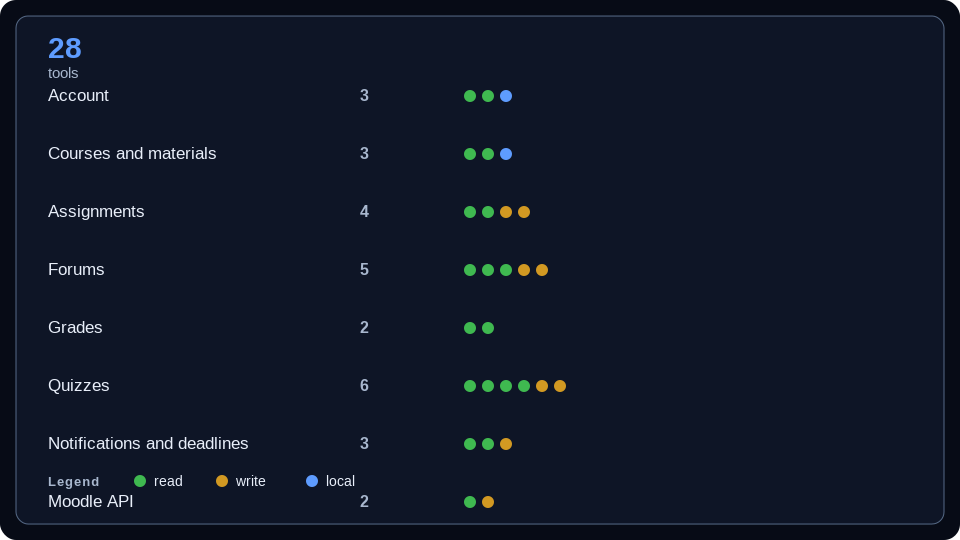
Diagram: the MCP tools grouped by account, courses, assignments, forums, grades, quizzes, notifications and Moodle API, with green dots for read, amber for write and blue for local.