MCP server · CLI · plugin · curs.upb.ro/2026
POLITEHNICA Bucharest Moodle, for your AI agent
upb-moodle opens your POLITEHNICA Bucharest Moodle account at curs.upb.ro/2026 in Claude Code, Codex, opencode and Google Antigravity. Courses, materials, assignments, forums, grades, quizzes, notifications and deadlines, with confirmation for every write.
Install Quick start Code on GitHub
- Version
- 0.2.5
- License
- Apache-2.0
- Python
- 3.10+
- MCP tools
- 28
- CLI commands
- 38
- Harnesses
- 5
What it is
upb-moodle has three faces that share one Moodle token. The upb-moodle-mcp MCP server speaks over stdio to your client. The upb-moodle CLI writes JSON on stdout, for scripts. The plugin adds the tools, the skill and the commands to Claude Code, Codex, opencode and Antigravity.
You do not need a separate account, and no server is installed somewhere else. Everything runs on your machine, and the only connections are to the configured Moodle and, during installation, to GitHub. In other words, upb-moodle is an MCP server for Moodle: Moodle automation inside your agent, with confirmation for every write.
Who it is for
For POLITEHNICA Bucharest students who want to ask in plain language: “what do I have to do this week?”, “download the year 2, semester 1 materials”, “what grade do I have in the seminar?”. The agent picks the right tool and shows you the result.
For people who work from a terminal: the CLI returns JSON, so it can go into a script or a pipeline without parsing text.
What you can do
Courses and materials
List courses by faculty, programme, year, semester and series. Download one course or a whole year, in parallel: files, pages, assignments, forums, quizzes, grades, links.
Assignments and drafts
See the requirement, the deadline, the submission state and the feedback. Submitting needs your confirmation, and assignments without drafts are protected.
Forums
Read discussions and posts. Replies and new discussions are sent only after you approve the text.
Grades
Grades for every course, or the grade items of one course, with feedback.
Quizzes
Read the questions, save answers without submitting, then finish the attempt only after a second approval.
Notifications and deadlines
New notifications and upcoming deadlines, in order. Marking one as read needs confirmation.
How the pieces connect
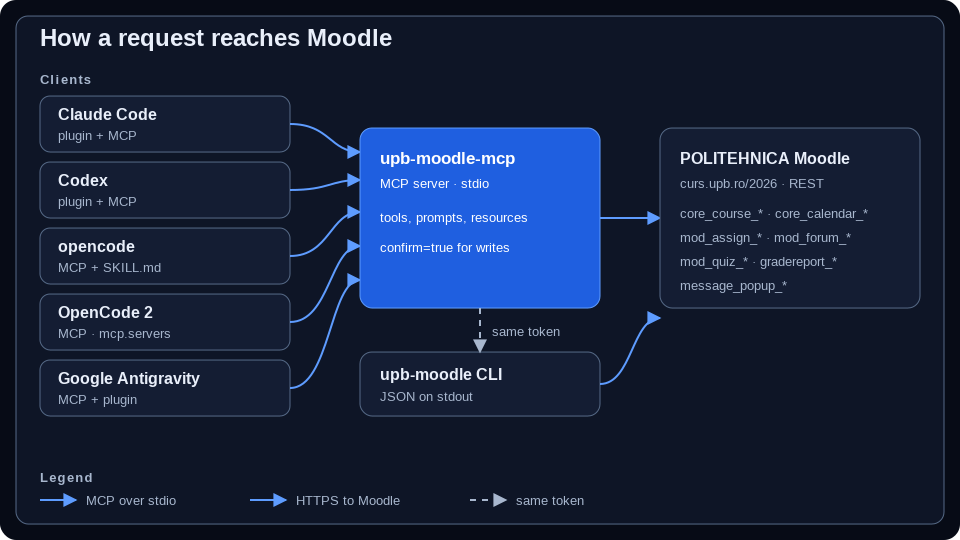
Diagram: Claude Code, Codex, opencode, OpenCode 2 and Google Antigravity start the upb-moodle-mcp server over stdio; the server calls POLITEHNICA Bucharest Moodle over HTTPS; the upb-moodle CLI uses the same token.
How it works
You sign in once, in a browser, through UPB Login (Keycloak, with a one-time code). The Moodle token goes into the system keychain (Credential Manager on Windows, Secret Service on Linux), not into project files.
upb-moodle install writes each client's configuration. The server reads the token at startup and never receives it through the client.
Every tool carries an annotation: read, write or local. Writes need confirm=true in MCP or --yes in the CLI; without it, the action stops.
Downloading writes everything into an ordinary folder, with Markdown summaries and the raw data in _raw. Files of the same size are skipped, so a repeated run downloads nothing again.
The server keeps no copy of your data. Every call reads from Moodle at request time, and downloading writes only to disk, in the folder you choose.
What you get
- An MCP server with 28 tools, 4 prompts and 2 resources.
- A CLI with 38 commands, with JSON output on stdout.
- A plugin for Claude Code, Codex, opencode and Antigravity.
- A skill that tells the agent what it may do and what needs confirmation.
A real output
[
  {
    "id": 103,
    "name": "Alta Materie",
    "faculty": "AC",
    "faculty_name": "Automatică şi Calculatoare",
    "program": "IA",
    "cycle": "L",
    "series": "C",
    "semester": 2,
    "academic_year": "2025-2026",
    "study_year": 1,
    "shortname": "03-AC-L-IA-A1-S2-AM-C"
  },
  {
    "id": 101,
    "name": "Materie Test",
    "faculty": "ETTI",
    "faculty_name": "Electronică, Telecomunicaţii şi Tehnologia Informaţiei",
    "program": "IETTI",
    "cycle": "L",
    "series": "B",
    "semester": 1,
    "academic_year": "2026-2027",
    "study_year": 2,
    "shortname": "04-ETTI-L-IETTI-A2-S1-MT-B"
  }
]upb-moodle courses, against the fake Moodle server used by the tests. The data is synthetic.Three common questions
Does it work with my account?
Yes, if you have an account on curs.upb.ro/2026. Login goes through UPB Login, as in the browser, once.
Where does the token go?
Into the system keychain: Credential Manager on Windows, Secret Service on Linux. Not into git and not into error messages.
Can it submit assignments without showing me what goes out?
No. Every write needs your confirmation, and assignments without drafts are refused by default.